Thank you!
Here is your sales funnel course
MODULE 1: Introduction
Hi! Thanks again for purchasing this course.
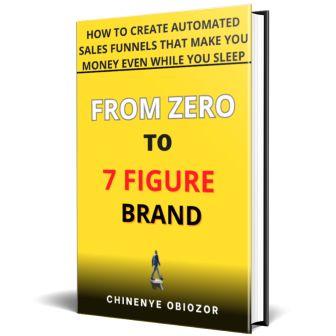
Before starting the video tutorials, read the book From Zero to 7 Figure Brand—it gives you the foundation for building a profitable, automated sales funnel.
Download the book, read it, then return to the videos for step-by-step guidance.
Table of Contents
Here is how to easily go through this course:
- Take a note and jot down important points so you don’t have to go through all the videos and book again to remember points.
- Read the book first before the videos for better understanding. Then start implementing immediately
Once, you are done with the book, go through the videos.
Setup your sales funnel. Now, you are equipped to create your sales funnel. Go ahead and nail it.
MODULE 2: Create your Lead Magnet
VIDEO LESSON ONE: Download a PLR Product for your Lead Magnet
Then go to chatgpt.com and use ChatGPT to rewrite and personalize it.
This way, you’re not sharing the same generic content as everyone else—you’re offering something fresh in just minutes.
VIDEO LESSON 2: Recreate the PLR product with ChatGPT
Sign up with your email, recreate the book, then head to canva.com to design your ebook cover.
We’ll show you how in the next video
VIDEO LESSON 3: Create eBook cover in Canva
In this video, you’ll learn how to design an eBook cover using Canva.
You’ll get a step-by-step guide and an intro to Canva’s tools.
Once your cover is ready, we’ll convert your eBook from Word to PDF so you can share or sell it easily.
VIDEO LESSON 5: Convert your eBook from MS Word to PDF & How to create Mockup for your eBook Cover
In this video, you’ll learn how to:
Convert your eBook from Word to PDF in minutes using pdf2go.com
Create a mockup cover using Adazing.com to make your eBook stand out
Next, we’ll show you how to set up a Flutterwave account to start receiving payments from your sales funnel.
VIDEO LESSON 6: Create Flutterwave Business Account For Receiving Payment from Customers
In this video, you’ll learn how to create a Flutterwave business account to collect payments in multiple currencies.
Key takeaways:
What you need to set up your account
Step-by-step guide to creating it
Go to Flutterwave.com to get started.
Next, we’ll move on to building your sales funnel using Systemetrical. Let’s dive in!
MODULE 3: Create your sales funnel & automate it
How to create your sales funnel with Systeme.io
VIDEO LESSON 7: create your landing page with Systeme.io
In this video, you’ll learn how to create a landing page using Systeme.io.
Systeme is an all-in-one marketing platform with tools for funnels, websites, email marketing, and more. It offers a free account, but you may need to upgrade for full features.
Key takeaways:
How to create a Systeme account
Set up your landing and thank you pages
Automate your first email to leads
To begin, sign up at Systeme.io.
VIDEO LESSON 8: Create a sales page with Systeme.io
n this video, you’ll learn how to set up a sales page and link it to your checkout page.
Takeaways:
How to create a high-converting sales page
How to write sales copy that drives purchases
VIDEO LESSON 9: Create a checkout page with Systeme.io
- How to link your checkout page to a payment processor like Flutterwave.
- How to create a checkout page and start collecting payments on your website.
VIDEO LESSON 10: Automate your sales funnel in Systeme,io
In this video, you’ll learn how to automate your email campaigns so they run on autopilot.
Takeaways:
Automate your sales and marketing emails
Segment buyers from non-buyers
Identify inactive leads and market to them differently
To get started, sign up at Systeme.io.
How to create sales funnel with Getresponse and WordPress (Alternative to Systeme.io)
VIDEO LESSON 11: Create your landing page with GetResponse & WordPress
In this video, you’ll learn how to build a landing page in WordPress using GetResponse.
Unlike Systeme, WordPress needs external tools like GetResponse to set up your funnel.
Key takeaways:
Create a landing page with GetResponse
Build an opt-in form and email list
Use Elementor to create a page on WordPress
VIDEO LESSON 12: Automate your sales funnel with GetResponse
In this video, you’ll learn how to automate your sales emails with GetResponse.
Takeaways:
Set up email campaigns
Segment buyers and non-buyers
Send personalized emails
Move customers up your value ladder
Next, test your funnel by using it as a customer to ensure everything works smoothly.
Let's Go Over it Again (Review)
CONGRATULATIONS!
Congrats on completing the book and videos — you’re now ready to build your first sales funnel!
Quick recap:
- Know exactly who your target audience is (see Chapter 1).
- Study top 4 competitors and learn from them (see Chapter 6).
- Create a product your audience urgently needs now.
- Offer a valuable lead magnet in exchange for their contact info.
- Build your funnel with Systeme.io or GetResponse + WordPress.
- Automate emails/SMS, starting with the Soap Opera Series.
- Drive traffic to your landing page (see Chapter 4) and nurture leads daily
Have questions, send us a message here. Have fun creating your sales funnel.
BONUSES

DOWNLOAD SIZZLEMANSHIP
This book tells you exactly what to say to win over any client to buy your product
EASY FACEBOOK ADS MASTERCLASS
Why Facebook Advertising?
Discover what no one tells you about Facebook ads in this easy guide.
After reading it, you’ll know how to create high-converting ads and start making consistent sales.
Tip: Read the guide before starting the video course for best results.
Things you must have in place
Here’s what you need to run Facebook ads:
Facebook Business Manager + Ads Account
Business Page (at least 3 weeks old)
Pixel installed on your website (for sales ads) or use WhatsApp/Messenger for lead ads
Debit/Credit card for payments
Valid ID to verify your identity and avoid restrictions
How to create Facebook business account
Here are the key takeaways from this video:
- You will learn step by step how to create your first Facebook business account
How to create your ad account
Here are the key takeaways from this video:
- How to create your ad account
How to add payment method
From this video, you will learn how to add a payment method and easily pay for your ads with either debit or credit card
How to setup Facebook business manager
This video teaches you how to properly setup your Facebook business manager
How to create and add Facebook page
This video shows you step by step how to create a Facebook page and add it to your ads manager
How to setup ads manager for lead generation ads
From this video, you will learn how to properly setup your ads manager for lead generation ads that convert
How to setup ads manager for sales ads
From this video, you will learn how to setup and optimise your ads manager for sales conversion ads
Ads retargeting: How to create Facebook pixel
This video shows you exactly how to create Facebook pixel to help you track people who have been to your website so you can reach out to them later and turn them into customers.
How to add Facebook Pixel on WordPress
This video shows you how to add your Facebook pixel to your WordPress website
How to add lead event tracking code to page
In this video, you’ll learn how to add lead tracking code to your site to track visitor actions and personalize your marketing for better results.
How to Install the Facebook Pixel helper
How to write your ad creatives
How to create campaign conversions for lead generation
Understanding campaign objectives
How to add payment method
Lorem ipsum dolor sit amet, consectetur adipiscing elit. Ut elit tellus, luctus nec ullamcorper mattis, pulvinar dapibus leo.
How to use Facebook built in video maker in ads manager to create ads video
Here you will learn how to use Facebook built in video maker to create your ads videos
Simple split testing your ads campaign
Security Measure: how to set ads spend limit
From this video, you will learn how to put a limit to how much you can spend on ads. This helps to protect your money in event your account is hacked.
How to spy on competitor's Facebook ads
In this video, you’ll learn how to spy on your competitors’ ads—see what they’re running, who they’re targeting, and how to position your own ads more effectively.
How to optimize and split test Facebook ads
How to duplicate Facebook ads sets correctly
In this video, you’ll learn how to duplicate ad sets for different audiences and a secret hack to avoid ad repetition—boosting your brand’s social proof.
How to create custome audiences
This video shows you how to create a custom audience of people who’ve interacted with your brand but haven’t bought—so you can retarget them across the web.
How do I segment buyers vs non-buyers effectively?
What tips ensure high-converting ad copy?
How to integrate Systeme.io with WordPress?
How to add customer mailing list as audience
In this video, you’ll learn how to create custom audiences from your email list for retargeting.
Facebook uses your customer data to find similar people and drive them to your business.
How to create lookalike audience
How to do Facebook re-targeting
Ads campaign Budget optimization
From this video, you will learn how to distribute your ads budget to all your ads sets so it spends the most money on ads that are giving the most promising results; helping you to maximize your money
How to delete unused page posts
Here you will learn how to declutter your ad account to remove a lot of clutter you might have.
What to do if Facebook account is disabled
- This video shows you how to recover your account and continue advertising on Facebook shout they disable your account for breaching their policy.
How to view audience breakdown in ads manager
In this video, you’ll learn how to track where your ad audience is coming from—device type, age, gender, location, and platform—so you better understand your target audience.